

SEO Autopilot Software
Publishing slows down when every article starts with a blank brief, a separate keyword spreadsheet, and a manual CMS task. The result is usually an uneven content library: a few strong pages, important gaps, and little time left to improve pages that already earn impressions.
SEO autopilot software gives that work a repeatable system. Rankdesk helps teams research opportunities, develop search-focused content, and move approved work toward publication across their existing site workflow.
Quick answer: how to use SEO autopilot software
Use SEO autopilot software in this order:
- Audit existing pages, competitors, and search opportunities before choosing topics.
- Build a topic cluster around a commercial page or core service.
- Create a brief with search intent, source requirements, internal links, and a conversion goal.
- Generate a draft, then add first-hand expertise, accurate claims, and useful examples.
- Review titles, links, metadata, facts, and publishing settings before release.
- Publish on a consistent schedule and use Search Console data to refresh pages with traction.
What SEO autopilot software should automate
The useful part of automation begins before drafting. Software should reduce repetitive research, organize work around real site gaps, and preserve the editorial decisions that protect your brand and customers.
Start with an inventory. Export the pages that already attract impressions, identify their intent, and map them to the commercial pages they support. Then compare that coverage with the subjects competitors address well. Google Search Console provides the query, page, and performance data needed for this review.
A practical SEO autopilot workflow handles five connected jobs:
- Finding content gaps around services, products, locations, and customer questions
- Grouping related topics so supporting articles strengthen a hub page
- Producing structured drafts based on a clear brief
- Routing drafts through review and platform publishing
- Flagging published pages for updates when performance data changes
Keep a human editor responsible for claims, product details, legal or medical language, pricing, and every page that represents specialist experience. Automation saves time when it removes repeatable production work while keeping accountable judgment in the workflow.
How to build an SEO autopilot workflow that can rank
1. Start with a revenue page and its supporting questions
Choose one page that already has a business purpose. For a service company, that might be /emergency-plumber-denver/. For an ecommerce store, it could be a collection page. Build articles that answer the questions people ask before they contact you or buy.
Consider a regional plumbing company with the main service URL /water-heater-repair-denver/. Its first plan included broad articles such as “plumbing tips” and “home maintenance checklist.” Those subjects had weak proximity to the service page and created few useful internal-link opportunities.
A tighter cluster used pages around water-heater repair cost factors, warning signs, tank versus tankless repair decisions, and questions to ask before booking service. Each article linked to the service page where a visitor could request help. The service page linked back to the supporting guides where visitors needed more detail.
Use Google Search Central's guidance on creating helpful, reliable, people-first content as the editorial baseline. Give each page a clear audience, a specific job to complete, and evidence appropriate to the subject.
2. Give every draft a brief that prevents generic pages
A reliable brief contains the target intent, primary conversion action, likely reader objections, page angle, source expectations, internal destinations, and information the business can supply from experience. Add a short note explaining why the page deserves to exist alongside the rest of the site.
For the plumbing example, the draft brief for “water heater repair cost in Denver” called for local decision factors, an explanation of diagnostic visits, repair-versus-replacement scenarios, and a booking path to /water-heater-repair-denver/. It also required the editor to verify every local claim before publication.
This extra context prevents a common failure mode: a group of polished articles that repeat the same advice under slightly different titles. Read our guide to automating SEO content creation for a deeper look at the research-to-brief process.
3. Use templates for structure, then add experience
Templates improve consistency. They should guide headings, FAQs, comparison criteria, calls to action, and internal links. They should never replace genuine information.
For a local service page, add details a generic draft cannot know: technician observations, common customer misunderstandings, service-area constraints, maintenance steps, and the criteria used to recommend repair or replacement. For ecommerce content, bring in fit guidance, product compatibility, return questions, and comparisons based on the actual catalog.
The plumbing team discovered that repair-cost drafts often assumed a single flat diagnostic path. In practice, access, part availability, tank age, and the source of the leak changed the scope. Adding those factors made the page more useful and gave the booking team language customers already understood.
4. Review before publishing, then measure after indexing
Run a pre-publish check for factual accuracy, intent alignment, duplicate angles, broken links, metadata, and calls to action. Confirm that each internal link helps a reader take a logical next step.
After publication, track impressions, clicks, queries, and the pages that gain or lose visibility. Google recommends using Search Console reports to monitor search performance and investigate changes. Refresh pages where new query patterns reveal missing sections, unclear answers, or a better supporting article.
SEO autopilot software comparison: capabilities to evaluate
A platform earns a place in your process when it handles the connected work between opportunity research and a controlled release. Use this comparison during vendor evaluation.
| Capability | Why it affects rankings and conversions | What to verify during a trial |
|---|---|---|
| Site and competitor research | Reveals gaps worth pursuing and pages worth improving | Check whether findings relate to your own URLs and market |
| Topic clustering | Creates supporting coverage around commercial pages | Review the suggested hierarchy and internal-link logic |
| Brief and draft creation | Speeds up production with repeatable standards | Test a specialist topic using your real source material |
| Editorial review | Protects facts, tone, and conversion language | Confirm your team can edit before publication |
| CMS publishing | Reduces manual handoffs and missed publishing tasks | Verify support for your CMS and publishing preferences |
| Performance-led refreshes | Keeps successful pages current as query demand changes | Ask how the workflow uses page-level search data |
RankPill and Outrank are names that may appear during a tool search. Compare each platform against the same working sample: one service or collection page, four supporting topics, real internal links, and a defined editorial owner. Current plans and implementation details should be checked directly with each vendor.
How Rankdesk supports a controlled SEO autopilot process
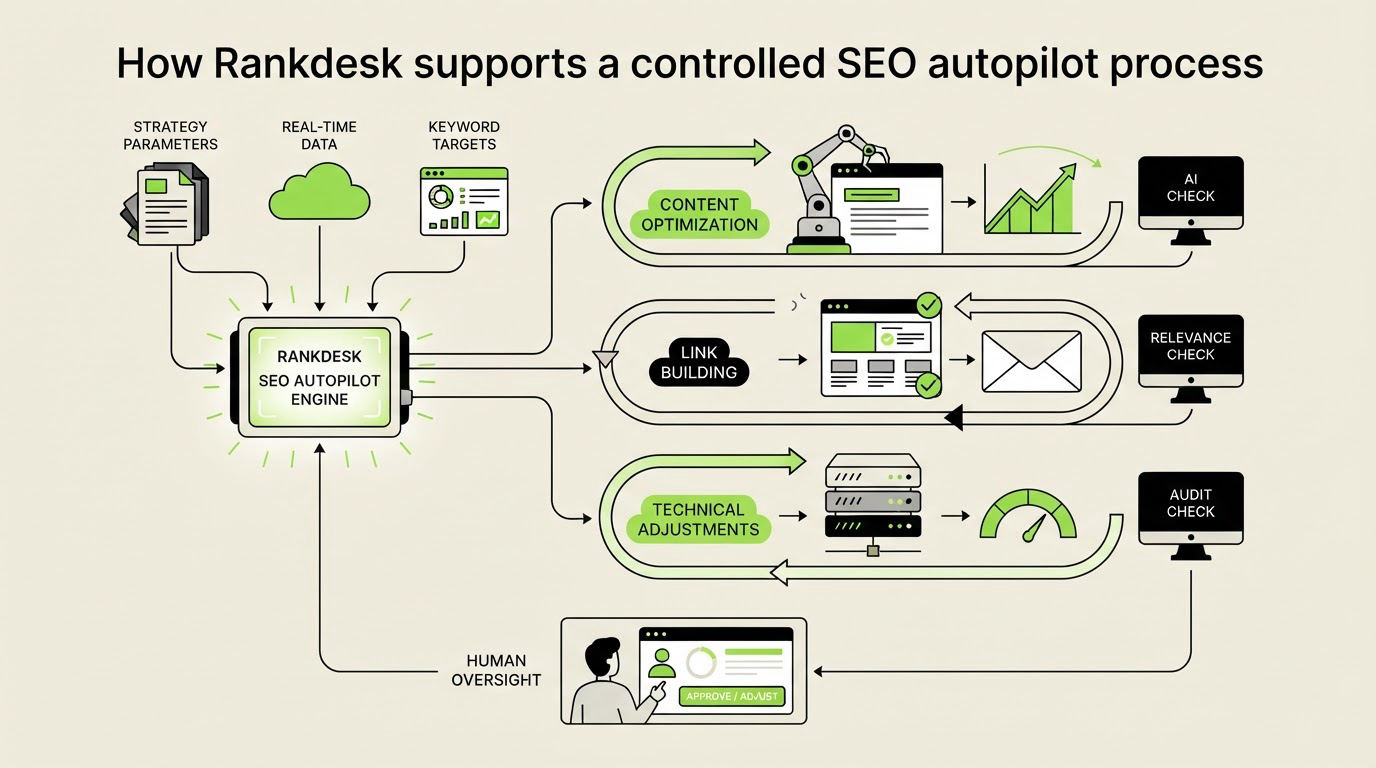
Rankdesk approaches SEO autopilot software as a connected content workflow. The aim is to give a marketer a usable route from research to publishable pages, rather than leaving strategy, writing, and delivery in separate tools.
First, add the site and clarify the pages or services that need support. Rankdesk researches your site, competitors, and keywords to surface content directions connected to your market. Explore the full workflow on the Rankdesk How It Works page.
Next, turn the selected opportunity into an article or landing-page assignment. Give the draft its audience, search intent, product context, required proof points, and internal destinations. This is where the plumbing company can specify the Denver service page, repair criteria, and booking call to action.
Then, review the generated page as an editor. Strengthen local expertise, correct details, improve the offer, and remove any section that fails to serve the target reader. Teams building content libraries can use the Rankdesk features to understand the research, creation, and publishing capabilities available in the platform.
Finally, publish or prepare content for your established release process. Rankdesk supports multiple publishing paths, including WordPress, so a marketing team can build content consistently on the platform that already runs its site. Review published work in cycles and feed high-intent query insights into the next briefs.
For companies that want visibility in AI answers as well as traditional results, write pages with clear entities, specific claims, and sources that can be checked. The practical methods in this guide to earning mentions in ChatGPT also improve the clarity and evidence quality readers expect from search content.
Use WordPress content publishing to improve rankings and AI citations
WordPress is a practical option for businesses that want consistent publishing without changing their website platform. The platform makes it easy to maintain a content hub, organize categories, and connect articles to revenue pages. Results still depend on the quality of the topic plan and editorial review.
For the plumbing example, publish the water-heater repair cost guide in a “Water Heater Help” category and link it from the main repair page. Link back to that service page with descriptive anchor text where the reader may need a professional diagnosis. Follow with tightly related pages only after the first guide is accurate, useful, and indexed.
Use a stable author byline, visible business details, specific service terminology, and well-supported answers. These signals help people and AI assistants understand who is making the claim and what the business actually knows. Avoid publishing a batch of interchangeable pages simply because a calendar has open slots.
For more on maintaining editorial standards at scale, see AI content autopilot without losing quality. It covers the review controls that keep automated publishing useful over time.
Common SEO autopilot software mistakes
Publishing volume can hide weak strategy for a while. The following issues usually show up later as thin traffic, poor conversions, or cleanup work.
First, teams target a broad keyword with no connection to a revenue page. Build clusters around a product, service, customer problem, or buying decision instead.
Second, briefs lack proprietary input. Provide product knowledge, local details, customer questions, and primary sources before drafting. These inputs create pages competitors cannot reproduce from public information alone.
Third, publishing teams skip internal links. Every supporting article should have a purposeful path to a relevant commercial page or next-stage guide.
Fourth, teams leave pages untouched after release. Export the last 90 days of Search Console data each month. Improve pages that receive impressions for valuable queries but lack a direct answer, useful proof, or a clear conversion route.
FAQ about SEO autopilot software
Can SEO autopilot software publish directly to WordPress?
Some platforms support WordPress publishing workflows. Confirm the available publishing controls, review steps, author settings, categories, and scheduling options before making the tool part of your process. Rankdesk lists supported platforms on its integrations page.
Will automated SEO content help a new website rank?
A new site needs focused topical coverage, accurate information, crawlable pages, relevant internal links, and time for search engines to evaluate the content. Start with a narrow commercial cluster where your business has genuine knowledge. Publish fewer, stronger pages before expanding coverage.
How often should I publish with SEO autopilot software?
Set a pace your team can review and sustain. A weekly release of well-researched content can outperform a faster schedule built from generic drafts. Let available expertise, search opportunity, and editorial capacity set the cadence.
Can this workflow help content appear in AI assistant answers?
Clear entity information, direct answers, factual support, and useful original detail give AI systems stronger material to reference. No tool can promise citations or specific AI assistant placement. Treat cited visibility as an outcome of trustworthy content and sustained topic authority.
If you want a more consistent way to plan, write, and publish search-focused content, see how Rankdesk works. It researches your site, competitors, and keywords, then creates articles and landing pages you can review or publish automatically.