

Content Marketing Automation Software
A content calendar often breaks between the keyword spreadsheet and the CMS. Briefs wait for writers, drafts sit in review, and approved articles still need to be formatted, linked, and published.
Content marketing automation software connects those steps. Rankdesk handles research, writing, review, and publishing in one workflow rather than treating the draft as the finished product.
Quick answer: how content marketing automation software works
Use this workflow to automate content marketing without giving up editorial control:
- Define the business goal, audience, and conversion action.
- Research the site, competitors, keywords, and existing pages.
- Map each topic to a new or existing URL.
- Create a search-focused draft using brand and source context.
- Review claims, intent, internal links, and conversion copy.
- Publish directly to a supported CMS such as WordPress.
- Monitor rankings, conversions, and AI assistant citations, then refresh the page.
The important unit is not the generated draft. It is the published URL and the feedback collected after publication.
What content marketing automation software should automate
Good automation removes repetitive production work while preserving decisions that affect accuracy, positioning, and search intent. It should carry context from research into the brief, from the brief into the page, and from the approved page into the CMS.
Consider a hypothetical outdoor retailer preparing example.com/camp-coffee-grinders. The commercial goal is to sell compact grinders, but the keyword set includes product comparisons, informational questions, and searches about grind consistency. Publishing one generic article for all of them would create a confused page.
The software should help separate those intents, identify the primary page, and prevent another article from competing with it. A useful workflow covers:
- Site and competitor research
- Keyword grouping and URL planning
- Article and landing page creation
- Internal linking and on-page structure
- Human review or approval rules
- CMS formatting and publication
Automation is less useful when it produces isolated text files. Someone still has to decide where each file belongs and move it through production.
How to research topics before automating content creation
Start with the site, not a blank keyword list. Export the last 90 days from Google Search Console first. Look for pages that already receive impressions, terms sitting close to page one, and cases where several URLs appear for similar searches.
Google explains the available query, page, country, and device dimensions in its Search Console performance report documentation. Use those dimensions to distinguish a weak page from a mismatch between the query and the page.
For the outdoor retailer, the export might show /manual-coffee-grinders appearing for camp-related searches. That creates a decision: improve the existing category page, build /camp-coffee-grinders, or publish a supporting guide. The answer depends on products, intent, and whether the new URL has a distinct job.
Competitor research comes next. Record which page types rank, what questions they answer, how products are compared, and where their evidence is thin. Do not copy their heading structure. Use the findings to understand the standard a page must meet.
Rankdesk can research the site, competitors, and keywords as part of the production workflow. For a closer look at the research stage, see how to use competitor research without copying competing pages.
How to turn keyword research into an automated content plan
Assign one primary intent and one target URL to every planned page. This prevents automation from producing five articles that answer the same question with slightly different titles.
For example.com/camp-coffee-grinders, the primary intent is commercial investigation. The page should compare grinder characteristics that matter outdoors, such as weight, capacity, adjustment stability, and cleaning. A separate guide could answer how to grind coffee while camping and link readers to the commercial page.
Set the conversion action before drafting. On this page, it might be viewing the grinder collection rather than joining a newsletter. That choice changes the page structure and the calls to action.
A practical content brief should specify the target URL, intent, audience, supporting topics, internal links, evidence requirements, and prohibited claims. If these inputs are vague, faster generation only creates a larger editing queue. The practical SEO automation workflow covers how to move from topic selection to a publishable page.
How content marketing automation software creates useful drafts
A draft needs more than a keyword and a word count. Give the system product facts, audience constraints, brand terminology, source requirements, and the page's role within the site.
Our outdoor retailer should not claim a grinder is ideal for backpacking merely because it is small. Weight, materials, capacity, and field use all need support. Unsupported specificity is a common failure mode because it sounds authoritative during a quick review.
Require source attribution for claims that can change or need verification. Google advises site owners to create helpful, reliable, people-first pages in its Search Essentials documentation. Automation does not lower that standard.
The first draft should include a clear answer near the top, descriptive headings, relevant internal links, and a conversion path that fits the intent. It should not mechanically repeat a target phrase. Read important passages aloud. Awkward wording is usually a sign that the page was built around keyword insertion rather than reader comprehension.
How to review automated SEO content before publishing
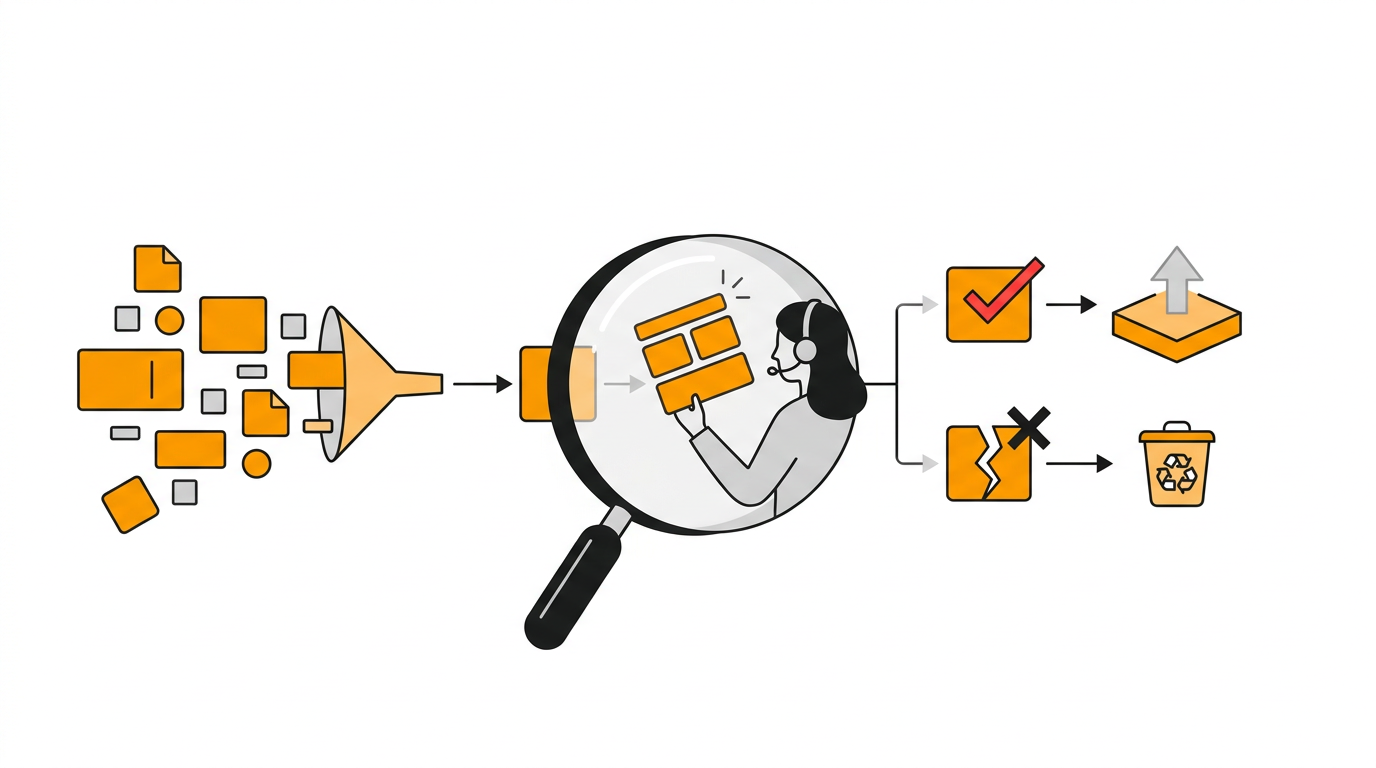
Use different review depths based on risk. A product comparison with technical claims needs close fact checking. A supporting glossary page may follow a lighter approval path if all definitions come from reviewed source material.
For the camp grinder page, verify each product attribute against the retailer's own catalog. Then inspect the search result claims, title, description, headings, links, and call to action. Confirm that the page does not overlap too heavily with /manual-coffee-grinders.
Reviewers should check facts and page purpose before polishing individual sentences. Otherwise, a carefully edited article may still target the wrong intent.
Use a repeatable review order:
- Confirm the URL and primary intent.
- Verify factual and product claims.
- Remove unsupported comparisons.
- Check internal links and anchor text.
- Review title, description, headings, and conversion copy.
- Approve, return, or schedule the page.
Agencies can apply stricter approval rules by client, topic, or regulated category. The guide to scaling agency SEO production without sacrificing quality explains where standardized checks help and where specialist review remains necessary.
How Rankdesk automates content marketing with WordPress
Once the manual workflow is clear, Rankdesk removes the handoffs that cause publishing delays. The user starts by providing site and business context. Rankdesk then researches the website, competitors, and relevant keywords before creating articles or landing pages.
For the outdoor retailer, the planned output is assigned to /camp-coffee-grinders, not delivered as an unnamed document. The generated page can be reviewed before publication, which allows the retailer to correct a product detail or change the conversion action.
Next, connect WordPress through Rankdesk's publishing integrations. WordPress exposes content operations through its official REST API posts endpoint, which supports creating and updating posts when a connected application has the required permissions.
After approval, Rankdesk publishes the formatted page instead of leaving a staff member to copy headings, links, and metadata into WordPress. Teams that trust their inputs and review rules can automate publication. Higher-risk sites can keep approval as a required step.
The full Rankdesk workflow from onboarding to publication shows how these stages connect. Research context stays attached to production, and publishing becomes part of the same system.
How automated publishing supports Google rankings and AI citations
Publishing is the start of measurement. Check whether Google indexed the intended URL, whether impressions appear for the target topic, and whether another page begins competing for the same searches.
For example.com/camp-coffee-grinders, early impressions for broad camping coffee questions might reveal that the page needs a short preparation section. If impressions appear mainly for unrelated kitchen grinder terms, the copy and internal links may be sending weak topical signals.
AI assistant citations require a related review. Test specific prompts a buyer might use, inspect any cited sources, and record whether your page is referenced accurately. Results can vary by prompt, model, date, and user context, so do not treat one appearance as a stable ranking.
Pages are more likely to be useful citation candidates when they make specific claims clear, support those claims, describe the business consistently, and answer focused questions directly. See the practical guides to earning mentions from ChatGPT and choosing generative engine optimization software for a deeper treatment of this process.
Refresh the source page when products, recommendations, or search intent change. Do not create a near-duplicate page simply because a monitoring tool finds a keyword variation.
Content marketing automation software comparison
The right setup depends on publishing volume, CMS requirements, and how much internal control your team needs.
| Approach | Research and planning | Drafting | CMS publishing | Typical fit | Starting software cost |
|---|---|---|---|---|---|
| Spreadsheets and documents | Fully manual | Manual | Copy and paste | Low volume or specialist topics | Varies by tool stack |
| Standalone generation tool | Usually separate | Automated | Often manual | Teams mainly trying to reduce drafting time | Varies by vendor |
| Custom API workflow | Built internally | Configurable | Built internally | Engineering-led teams with unusual requirements | Build and maintenance costs vary |
| Rankdesk | Site, competitor, and keyword research | Articles and landing pages | WordPress, Shopify, and Lovable support | Teams wanting one research-to-publishing workflow | From $39 per month |
Outrank and RankPill also serve buyers comparing automated SEO production platforms. Check each vendor's current product and pricing pages before choosing, especially for supported publishing destinations, approval controls, limits, and billing terms. The Rankdesk versus RankPill comparison examines those workflow differences in more detail.
Rankdesk is the stronger fit when the objective is to connect research, page creation, review, and supported CMS publishing. Review the current features and pricing against your required volume before committing.
Common content marketing automation mistakes
The first mistake is automating before defining URL ownership. That produces cannibalization, redundant pages, and confusing internal links.
The second is approving pages based on grammar alone. A fluent draft can contain an invented feature, weak evidence, or the wrong conversion action. Verify the substance.
The third is publishing at a volume the site cannot support. More pages create more maintenance. Start with a focused cluster, monitor it, and expand when the workflow produces accurate pages consistently.
The fourth is measuring output instead of outcomes. Published article count is an operational metric. Search visibility, qualified visits, conversions, assisted sales, and accurate AI citations provide stronger evidence that the system is helping.
Content marketing automation software FAQ
Can content marketing automation software publish directly to WordPress?
Yes, when the platform supports a WordPress connection and has the required permissions. Rankdesk supports WordPress publishing, so an approved article can move from production into the CMS without manual copying. Keep human approval enabled for sensitive topics or unverified product claims.
Will automated content rank on Google?
Automation does not guarantee rankings. The page still needs a useful purpose, accurate information, sound technical access, relevant internal links, and enough authority to compete. Software improves production consistency, but it cannot make a weak topic or unsupported claim valuable.
Can automated pages get mentioned by ChatGPT or Claude?
They can be cited when an assistant finds the page relevant and trustworthy, but no platform can guarantee mentions. Publish clear, attributable information, strengthen entity consistency, and monitor representative prompts over time. Treat citation visibility as variable rather than permanent.
Should I automate articles, landing pages, or both?
Automate both when each page has a distinct intent and conversion path. Articles usually answer questions or support a commercial page. Landing pages target a defined service, category, or use case. Avoid generating large sets of location or keyword variants unless every page provides genuinely distinct information.
How much editorial control should I keep?
Keep control over strategy, factual approval, brand positioning, and high-risk claims. Routine formatting, metadata preparation, internal linking suggestions, scheduling, and CMS publication are better automation candidates. Tighten review rules when the cost of an error is high.
If you want a more consistent way to research, create, and publish search-focused pages, see how Rankdesk supports automated content marketing. It researches your site, competitors, and keywords, then creates articles and landing pages you can review or publish automatically.
Start auto-writing for your site today
Create a free account, connect your site and generate your first article in minutes. No credit card needed.